

本专栏旨在记录本人第一次逆向成功过程,附带诸多踩坑记录,由于网上我能搜到的文章大多语焉不详或者说不够面向萌新向,顾载之。
需要用到的妙妙工具
1.Frida 2.Frida-Tool 3.Frida-IL2CPP-Bridge 4.TS环境 5.Python环境 6.ADB工具 7.IDA Pro 8.dnSpy 9.Il2CppDumper 10.一台Root了的Android手机1. Frida 2. Frida-Tool 3. Frida-IL2CPP-Bridge 4. TS 环境 5. Python 环境 6. ADB 工具 7. IDA Pro 8. dnSpy 9. Il2CppDumper 10. 一台已获取 Root 权限的 Android 手机
这方面网上教程很多就不细说了,后面用到的会仔细讲。
1.逆向APK
首先,从应用商店下载对应游戏的APK,拿到libil2cpp.so和global-metadata.dat使用Il2CppDumper导出DummyDLL以及相关资源。即可使用dySpy 查看代码(但此时只能看见函数名和参数)。具体搜索一下如何使用Il2CppDumper。
2.分析代码获取源码
大部分Unity的IL2CPP手游都会使用代码热更,只要可以找到加载DLL的函数,hook即可获得解密后的DLL。而恰巧我碰到的是使用HyBridCLR热更方案,所以寻找对应的加载DLL和元数据的函数即可。使用Frida进行Hook。
3.绕过Frida反调试
大部分手游应该都有做Frida反调试机制,如何绕过Frida反调试网上也有很多文章可以参考。但很不幸我试了很多都没办法,即使我定位了检测的so和对应函数。于是我采用的方法是使用Frida-Server(去特征版)加上直接Hook了libc.so里的strstr和strcmp,从源头上让他无法检测对应路径。(这样做的坏处就是会造成很大性能影响,但对逆向来说尚可接受)TS代码如下:
function replace_str() {var pt_strstr = Module.findExportByName("libc.so", 'strstr'); var pt_strcmp = Module.findExportByName("libc.so", 'strcmp'); Interceptor.attach(pt_strstr, { onEnter: function (args) { var str1 = args[0].readCString();
var str2 = args[1].readCString(); if (str2.indexOf("tmp") !== -1 || str2.indexOf("frida") !== -1 || str2.indexOf("gum-js-loop") !== -1 || str2.indexOf("gmain") !== -1 || str2.indexOf("gdbus") !== -1 || str2.indexOf("pool-frida") !== -1|| str2.indexOf("linjector") !== -1) { //console.log("strcmp-->", str1, str2); this.hook = true; }
}, onLeave: function (retval) { if (this.hook) { retval.replace(0); } } }); Interceptor.attach(pt_strcmp, { onEnter: function (args) { var str1 = args[0].readCString(); var str2 = args[1].readCString(); if (str2.indexOf("tmp") !== -1 || str2.indexOf("frida") !== -1 || str2.indexOf("gum-js-loop") !== -1 || str2.indexOf("gmain") !== -1 || str2.indexOf("gdbus") !== -1 || str2.indexOf("pool-frida") !== -1|| str2.indexOf("linjector") !== -1) { console.log("strcmp-->", str1, str2); this.hook = true; } }, onLeave: function (retval) { if (this.hook) { retval.replace(0); } } })}replace_str();var pt_strstr = Module.findExportByName("libc.so", 'strstr');var pt_strcmp = Module.findExportByName("libc.so", 'strcmp');Interceptor.attach(pt_strstr, {onEnter: function (args) {var str1 = args[0].readCString();
var str2 = args[1].readCString();if (str2.indexOf("tmp") !== -1 ||str2.indexOf("frida") !== -1 ||str2.indexOf("gum-js-loop") !== -1 ||str2.indexOf("gmain") !== -1 ||str2.indexOf("gdbus") !== -1 ||str2.indexOf("pool-frida") !== -1 ||str2.indexOf("linjector") !== -1) {//console.log("strcmp-->", str1, str2);this.hook = true; }
}, onLeave: function (retval) {if (this.hook) {retval.replace(0); } } });Interceptor.attach(pt_strcmp, {onEnter: function (args) {var str1 = args[0].readCString();var str2 = args[1].readCString();if (str2.indexOf("tmp") !== -1 ||str2.indexOf("frida") !== -1 ||str2.indexOf("gum-js-loop") !== -1 ||str2.indexOf("gmain") !== -1 ||str2.indexOf("gdbus") !== -1 ||str2.indexOf("pool-frida") !== -1||str2.indexOf("linjector") !== -1) {console.log("strcmp-->", str1, str2);this.hook = true; }}, onLeave: function (retval) {if (this.hook) {retval.replace(0); } } })}replace_str();至于具体如何使用Frida,资料众多,不展开描述。
4.转存DLL
由于我被Frida,Frida-IL2CPP-Bridge以及各种环境的版本折磨之后,我统一选择了最新版本(Frida 16.5.1),但是使用python脚本向进程注入js脚本始终会报错失败,于是使用了一种折中的方式转存DLL到本地,再通过ADB工具传输到PC端。
Il2Cpp.perform(() => {
// 替换为你的类名
const kdll=Il2Cpp.domain.assembly(“Assembly-Framework”).image;
const klass = kdll.class(“Framework.Files.FileSystemExtensions”);
const kmethod = klass.methods.find(m => m.name === “ReadSecretBytes” && !m.isGeneric);//需要hook的解密函数
const fileClass = Il2Cpp.domain.assembly(“mscorlib”).image.class(“System.IO.File”);
const writeAllBytesMethod =fileClass.method(“WriteAllBytes”); // 参数为文件路径和 byte[]
let num: number = 0;
function createDirectoryIfNotExists(path) {
const directoryClass = Il2Cpp.domain.assembly(“mscorlib”).image.class(‘System.IO.Directory’);
const existsMethod = directoryClass.method(‘Exists’);
const createMethod = directoryClass.method(‘CreateDirectory’);
let p=Il2Cpp.string(path);
// 检查目录是否存在
const exists = existsMethod.invoke(p);
if (!exists) {
// 如果不存在,则创建目录
createMethod.invoke(p);
console.log(“Directory created: ” + path);
} else {
console.log(“Directory already exists: ” + path);
}
}
kmethod.implementation=function(f
console.log(“implementation”);
let code=kmethod.invoke(f,p,key);
// 创建 FileOutputStream
let p2=“/storage/emulated/0/Android/data/你游戏包名/files/My”;
createDirectoryIfNotExists(p2);
let path
num+=1;
console.log(“Path--->“+path);
writeAllBytesMethod.invoke(path,code);
return code;
}
// 替换为你的类名
const kdll=Il2Cpp.domain.assembly(“Assembly-Framework”).image;
const klass = kdll.class(“Framework.Files.FileSystemExtensions”);
const kmethod = klass.methods.find(m => m.name === “ReadSecretBytes” && !m.isGeneric);//需要 hook 的解密函数
const fileClass = Il2Cpp.domain.assembly(“mscorlib”).image.class(“System.IO.File”);
const writeAllBytesMethod =fileClass.method(“WriteAllBytes”); // 参数为文件路径和 byte[]
let num: number = 0;
函数 createDirectoryIfNotExists(path) {
const directoryClass = Il2Cpp.domain.assembly(“mscorlib”).image.class(‘System.IO.Directory’);
const existsMethod = directoryClass.method(‘Exists’);
const createMethod = directoryClass.method(‘CreateDirectory’);
let p=Il2Cpp.string(path);
// 检查目录是否存在
const exists = existsMethod.invoke(p);
if (!exists) {
// 如果不存在,则创建目录
createMethod.invoke(p);
console.log(“目录创建成功: ” + path);
} else {
console.log(“目录已存在: ” + path);
}
}
kmethod.implementation=function(f
console.log(“implementation”);
let code=kmethod.invoke(f,p,key);
// 创建 FileOutputStream
let p2=“/storage/emulated/0/Android/data/你游戏包名/files/My”;
createDirectoryIfNotExists(p2);
let path
num+=1;
console.log(“路径--->“+path);
writeAllBytesMethod.invoke(path,code);
return code;
}
5.分析代码,找到AB包解密逻辑
将上一步得到的DLL使用dnSpy打开,可以看见大部分代码逻辑,找到加载AB包的逻辑以及指定函数LoadAssetBundleAsync,打开IDA Pro跳转到指定函数分析解密逻辑。
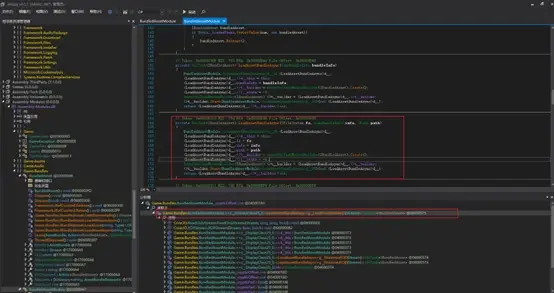
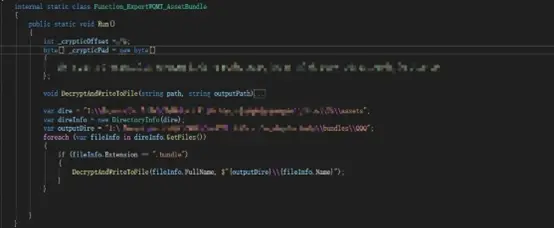
然后将汇编代码转换成C#代码,新创建一个.Net控制台工程将加密的AssetBundle解密即可。
如何判断是否解密成功:任意打开一个Bundle文件,开头是UnityFS,基本代表成功。
6.提取资源文件
如何从未加密的AssetBundle里提取资源文件,那网上的教程可太多了,不写了。
7.提供一种暴力逆向获得AssetBundle的思路
直接hook UnityEngine.AssetBundleModule程序集内的UnityEngine.AssetBundle类的几个Load函数,只要项目没有魔改AssetBundle那一定会经过这几个函数。
缺陷:只能逆向出加载过的AssetBundle,想要全逆向需要把游戏全流程跑一遍。
结尾:踩坑记录&吐槽
1.IDA Pro一定要下带插件的版本,方便F5查看伪代码。
2.Frida对应环境的各种工具版本(我放弃了直接用最新版)。
3.不知道为什么python调js报错,不过我直接舍弃python就是了,log还更详细。
4.Frida反调试,刚开始一hook进程就秒退,还以为是代码问题或者环境问题查半天才知道人家会检测~~~
5.使用Frida-IL2CPP-Bridge模块 TS转JS时会有报错,直接无视即可,运行不报错就行。
6.最好是使用一台root的手机(x鱼上一两百就能收到),或者使用Frida 跳过root的方法(没试过),以及模拟器似乎支持不太好,可能有其他坑(未尝试)。
最后忠告,本文仅是为了学习逆向Unity工程来达到学习先进的代码理念和资源管理方式,请勿滥用。